Hey fellow creators! So, as some folks may have recently become aware, Tumblr posts with external links don’t show up in relevant tags (as detailed in this post). IE, if you post a Steven Universe picture and tag it “Steven Universe” and there’s an external link in the post, it won’t actually show up in the “Steven Universe” tag! This is very frustrating! What if I make a post and want to link to my Twitter in the description? What if I want to link people to my online store when I post a piece of art? What if I want to link to a YouTube video and still have it show up under the relevant tags I put into the post?
Hold on to your butts kids cuz here’s how we cheat the system.
—
The thing about Tumblr’s Anti-Linking nonsense works is that it only blocks external links. Internal links are fine. So if you wanted to post a link to another Tumblr post, or someone’s Tumblr blog, you’re good. But if you wanted to link to your Twitter page or something, you’re screwed. So, all we gotta do is make your external link into a Tumblr link. Sounds weird. I know. But here’s how it works.
First, go to your Tumblr blog. Hit the “Edit Theme” tab.
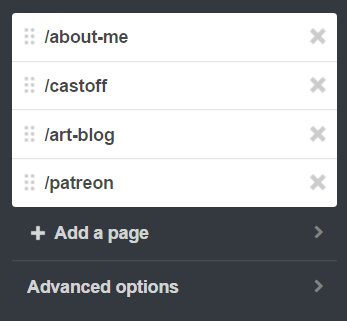
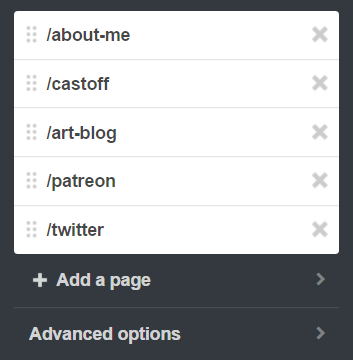
In the theme editor sidebar, scroll all the way to the bottom, the “Page” section. (Here’s what mine looks like- I already have a few of these set up)
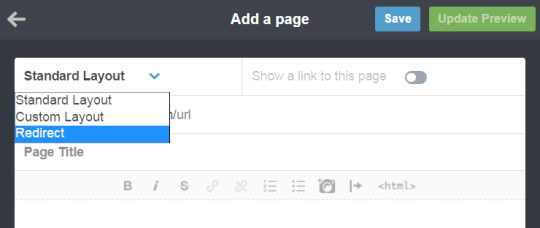
Hit “Add a Page”, and this window will pop up. By default it’s set to be a Standard Page. Hit the dropdown and select “redirect”.
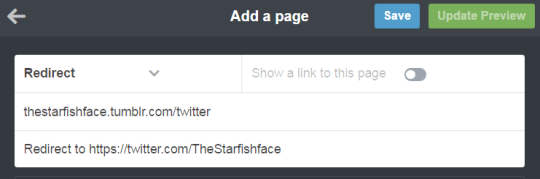
For this example, let’s say I want to link to my Twitter page. I’ll name the page “Twitter” (this is what the redirect URL will end up being- IE yourblogname.tumblr.com/Twitter), and insert my Twitter URL under the “Redirect To” tab. Leave “Show a link to this page” turned off. (Unless you want the link to show up on your blog, in which case, turn it on. Do what you want, I’m not your mom)
Hit “Save”, and your new page should now show up on your Page list!
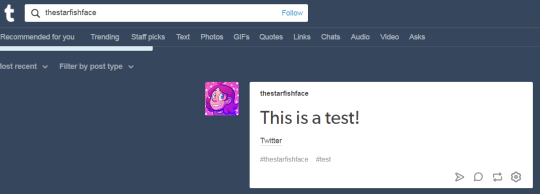
And done! So now, let’s say I wanted to use the new link in the text portion of a post. Simply use the Tumblr redirect link instead of the direct URL! As a test, I linked to my Twitter in a test post, using the redirect link instead of the direct link, and there it is in the tag! Success!
I recommend making a Redirect Page for any external links you’ll be using frequently. I like to post links to my webcomic/Twitter in posts fairly often, but doing that made me take a pretty big hit since my posts wouldn’t show up in tags. With this method, I can keep the external links, and have stuff show up when I tag it! Workarounds are fun!
As of today, November 17, 2018, any post with links, any links, even to other tumblr posts, just don’t show up anymore in tumblr’s search engine.
I just found out about it, after I posted a fic with a link to my masterlist and it got little to no notes (it shuldn’t). I was right – the moment I deleted the links, my post magically appeared in the search again. Wow.
Please spread the word to warn the others.
This affects artists who want to cross promote their work, writers who want to link to previous chapters or to a masterlist, and editors who want to link to their YouTube channels, among just a few. This new policy will kill content creators’ ability to spread their work, and for what? A poor attempt to use the algorithm to crack down on porn bots and scammers? Sad.
In the meantime, here’s what I suggest: post your work with no added links, and tell people to check the notes for your masterlist, story navigation, links to ko-fi, patreon, and other social media sites. Make sure you have all those things ready, then paste it into a reblog and have people access them that way. It’s stupid, but it’s a work around we’ll have to use until tumblr gets their act together.
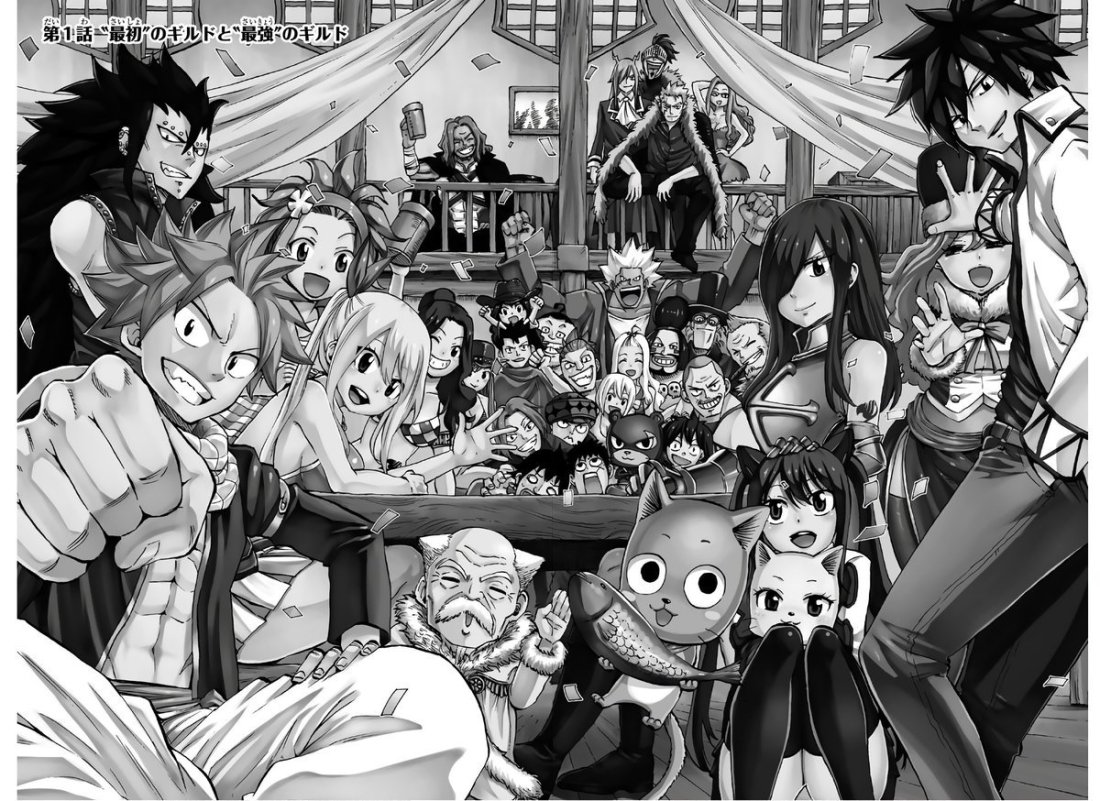
Holy hell I was in my local Barnes and noble and I found this gem! It even has the original fairy tail story in it!!! This is a rare find!!!
So…I just learned that tumblr has a newish policy. New blogs are hidden from tags. So….say you make an ask/rp blog and then put out a post to get attention for it………no one can see it. until you ‘seem human’ through re blogging and commenting. Which ask blogs rarely do. also sideblogs cant like things
this explains why bots have taken to rebloging peoples posts and commenting on them. To get around the policy and seem ‘human’
So if you made a new blog and feel like it was ignored…..its not your fault. Its tumblrs shitty system. im testing getting around it by pming friends through the blog,,,so we’ll see if that works
I’ve had a this blog for… like.. what… 6 or so months now? After taking a break from tumblr. My tags still don’t work.






 MangaGuitar96.wordpress.com